THE SILENT-MODE OVERRIDE FOR FAMILIES • Built for Parents & Elders

Always within reach.

When your mom needs her evening blood pressure medicine or your teen's phone is muted after practice, reachya overrides silence and rings aloud until confirmed safe.

✓ Guaranteed Physical Audio Override
✓ Recipients Never Pay or Register
✓ Automated 90s Safety Watchdog
The UX Motion Story

How reachya Solves the Silence Crisis

An auto-advancing visual walkthrough of the problem, the breakthrough, and the closed-loop relief.

⚠️ ACT 1: THE SILENCE PROBLEM

The phone is sitting 3 feet away. Completely silent.

Mom flipped the mute switch while watching TV. 4 phone calls go straight to voicemail. WhatsApp messages sit buried under 30 unread family group chats. You are 20 miles away, panicking whether she remembered her 7:00 PM heart medicine.

🔇

The Root Cause

Normal consumer apps unconditionally obey the physical mute switch and Focus filters. In real family emergencies, silence is dangerous.

7:15
5G ● 94%
7:15
Tuesday, November 7
Physical Mute Switch: ON
📞 PHONE • MISSED 2m ago
Sarah (Daughter)
4 missed calls • Silenced by hardware switch
💬 WHATSAPP Now
38 unread messages
Book Club, Gardeners, Family Chat...
0 dB Audio Output • Muted in Living Room
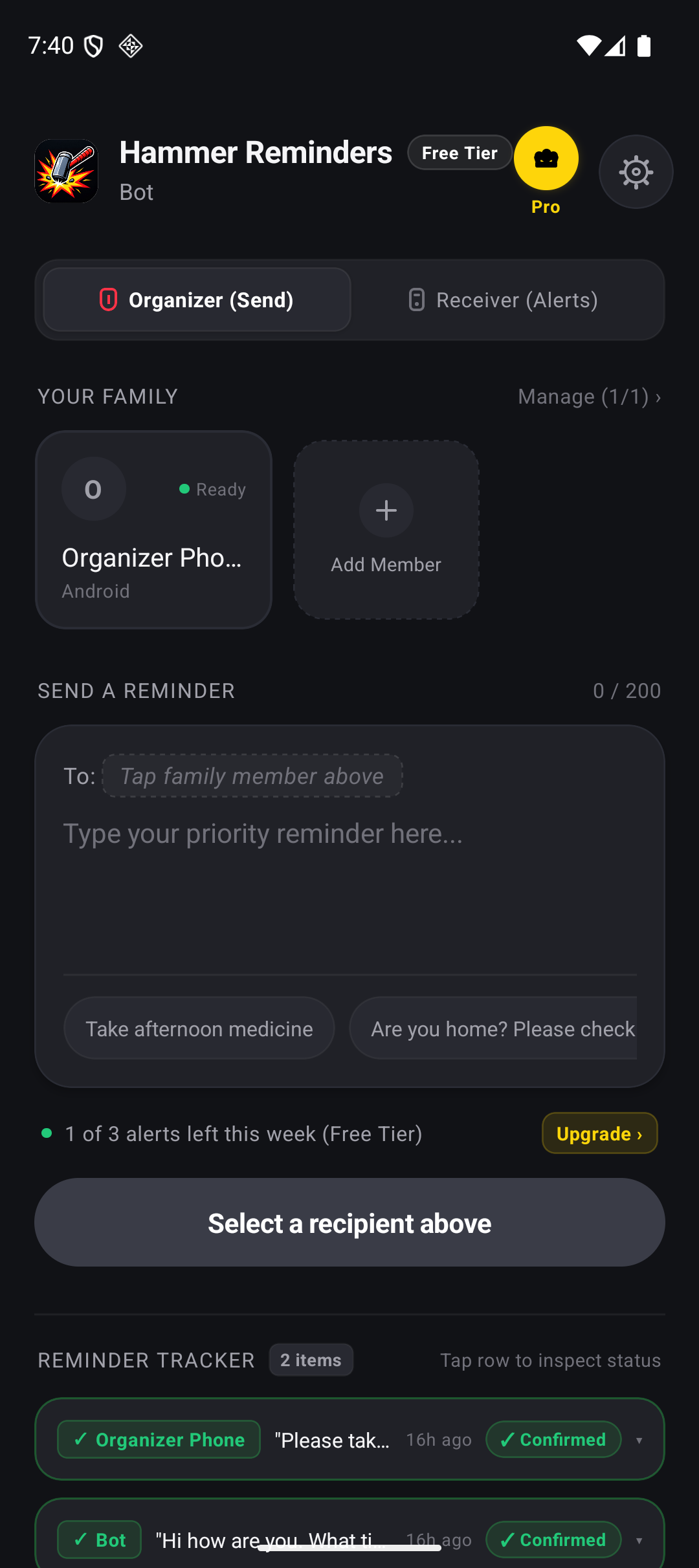
The Real Mobile Experience

Designed for Clarity. Built for Zero Friction.

Flip through the actual production screens running on iOS and Android devices.

reachya Mobile Screen
Primary Organizer Dashboard Single-tap family member chips, character-counted composer & live reminder feed.
Built for Parents Under 55

Bridging the Two Generations You Love

Modern parents carry the mental load of aging parents and busy teenagers. reachya gives you total certainty in both directions.

🌸

For Aging Parents (70s & 80s)

They frequently misplace phones between couch cushions or keep them permanently on silent. reachya's maximum-volume alarm wakes them for daily insulin, blood pressure tablets, or scheduled doctor check-ins.

✓ Zero passwords for them to forget
🎒

For Teens & High Schoolers

Teens keep their phones on 'Do Not Disturb' 24 hours a day. When school buses are delayed in bad weather, or practice runs late, one priority alert breaks through their AirPods and backpack instantly.

✓ Slide to confirm they arrived safely
🛡️

For Your Own Peace of Mind

Stop panic-driving across town just to see if your mom is okay. The moment she slides her screen, your phone celebrates with an acknowledgment ping and saves the exact time in permanent history.

✓ 90-second automated SMS fallback
The Household Pass

Simple Pricing. Zero Recipient Friction.

Strict Rule: Recipients NEVER Pay. Pair grandma, kids, and spouse for free. Only the sender phone manages the pass.

Free Household Forever
$0 / mo

Essential coverage for 1 family member with guaranteed audio breakthrough.

  • ✓ 1 Recipient Device
  • ✓ 3 Priority Alerts / week
  • ✓ Level-1 Audible Breakthrough
  • ✓ Emergency Exemption included
Get Started Free
Best Value • Most Popular
👑 Annual Pass Save 25%
$14.99 / year ($1.25/mo)

Complete household protection with unlimited priority reminders for all family members.

  • ✓ Up to 6 Family Devices
  • ✓ Unlimited Priority Alerts
  • ✓ 4-Stage Escalation Ladder
  • ✓ 90s Automated SMS Watchdog
Get Annual Household Pass
Lifetime Pass Pay Once
$29.99 / one-time

Pay once and protect your family for life. Never worry about recurring subscriptions.

  • ✓ Up to 6 Family Devices
  • ✓ Unlimited Alerts for Life
  • ✓ All Escalations & SMS Watchdog
  • ✓ All Future App Upgrades
Get Lifetime Pass
Quarterly pass also available at $4.99 / 3 months. Cancel anytime with 1 tap.

Common Questions from Parents

Does it genuinely ring aloud when an iPhone silent switch is set to red?

Yes. reachya uses Apple's official Critical Alerts entitlement and Android Alarm Manager. It bypasses hardware mute switches, system volume sliders, and active Do Not Disturb focus modes for verified family members.

Will my elderly mother get confused by the app?

She never has to configure anything. In Recipient Mode, there are zero logins or settings. She scans your QR code once. When an alert arrives, the screen lights up with big text and a simple slide bar: "Slide to Acknowledge".

What is the Emergency Exemption rule for Free Tier users?

If you run out of your weekly free alerts during an actual emergency, reachya will NEVER lock you out with a paywall screen. We dispatch your alert immediately under our Emergency Exemption and only show pricing options after your family is confirmed safe.

reachya Logo

Give Your Family the Safety Net Today.

Install on iOS or Android in 30 seconds. Sleep soundly knowing your family can always break through silence.